50 Trending AI BusinessAutomations
n8n has thousands of free workflows — scattered, untested, undocumented. This is the opposite: the 50 automations businesses actually pay for, handpicked, built and tested, and documented node-by-node. Import, wire your credentials, deploy.
Stop digging through 10,000 free templates. Deploy the 50 that matter.
01 / Why pay?
n8n has thousands of free workflows. So why buy these?
Because "free" means a haystack. The community library is enormous, unsorted, and mostly untested — you can lose a week finding and fixing the handful that actually work. This suite is the shortcut: the automations that are in demand right now, already built and proven.
The haystack
Thousands of templates, no ranking, no signal. Finding the ones worth running is the work — before you've automated anything.
Errors on import
Half the free templates were built on outdated nodes and throw errors the moment you load them. You debug someone else's abandoned work.
Zero documentation
A free workflow with no notes is a black box. You can run it, but you can't understand it, adapt it, or hand it to a client's team.
No sense of what's hot
Which automations do businesses actually pay for right now? The free library gives you no idea. Guessing is expensive.
They don't work together
Fifty unrelated templates means fifty conventions and no shared error handling — a failure at 2am that nobody sees for a week.
Untested
"It worked for someone once" is not the same as tested. With real customer data on the line, that difference costs you.
This suite is the fix: 50 handpicked, in-demand automations — built from scratch, tested, documented node-by-node, and designed to run as one system with shared error handling and no stored secrets.
02 / Contents
Everything in the download, listed before you buy.
- ✓50 import-ready workflows
Plain n8n JSON across 8 categories — Sales, Marketing, Support, Finance, Operations, HR, Data, plus three shared Core modules the rest rely on.
- ✓The 100+ page guide
One chapter per workflow: what it does, why it matters, the real n8n canvas, a node-by-node table, setup, credentials, customisation and the gotchas.
- ✓No secrets in any file
Every node references your accounts by name — you create each credential once in your own n8n. Nothing to leak, nothing to scrub before a client handoff.
- ✓Shared error handling built in
A Notify Hub and a Global Error Handler mean 50 active workflows give you one alert stream, not fifty silent failures.
- ✓Free updates for life
Come back to your download link any time. The library grows; existing customers get every new workflow free.
03 / Proof
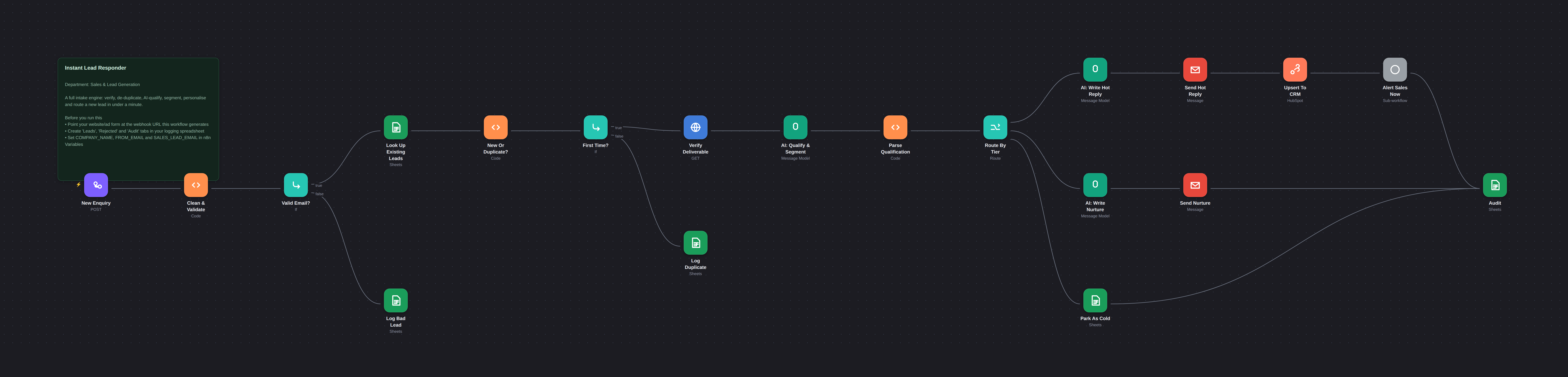
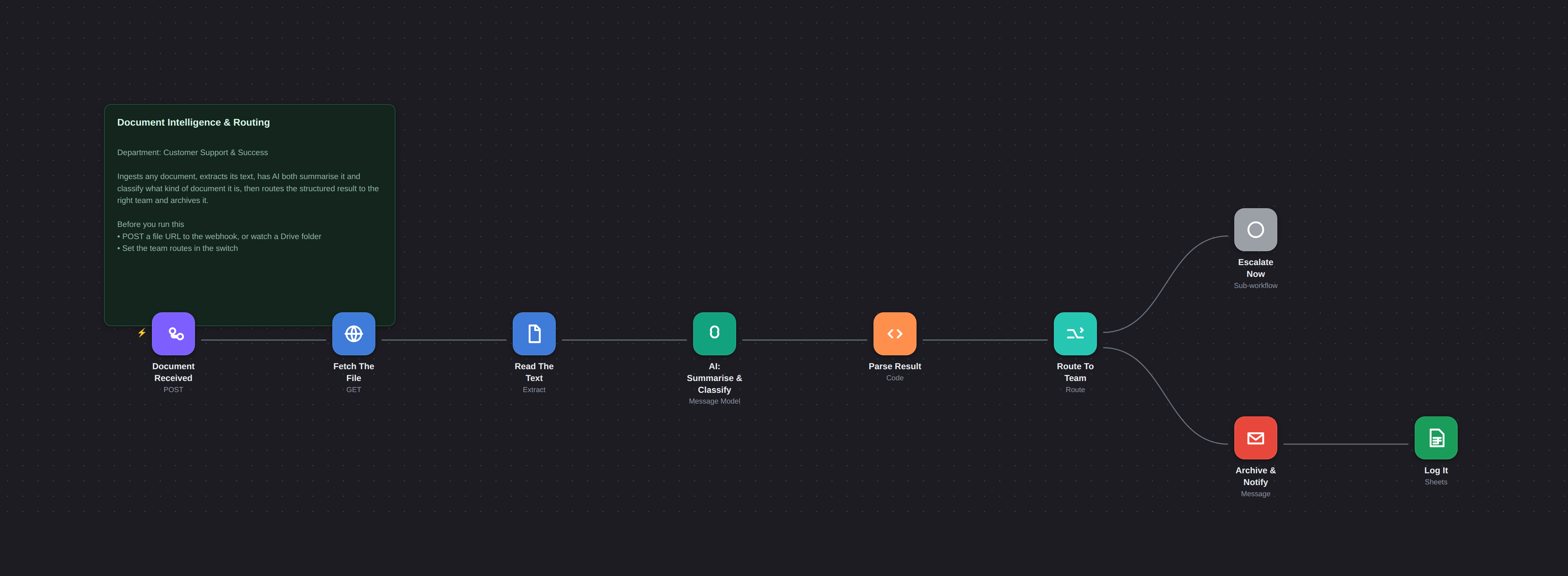
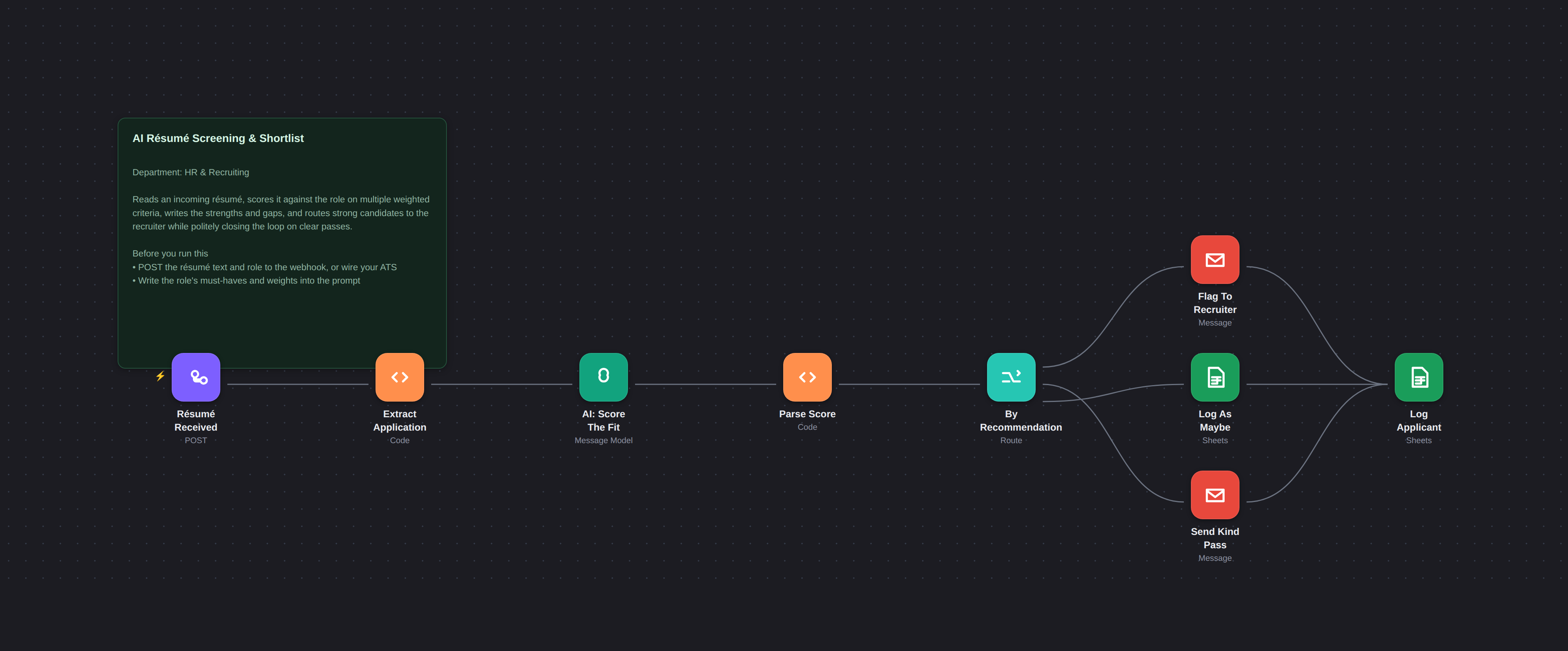
Real workflows. Real canvases. Not diagrams of an idea.
Every image below is an actual workflow from this pack. The sticky note on each canvas is the setup checklist that ships inside the file — so you always know what to configure next.
✓ Rendered from the actual workflow files — import them and they look exactly like this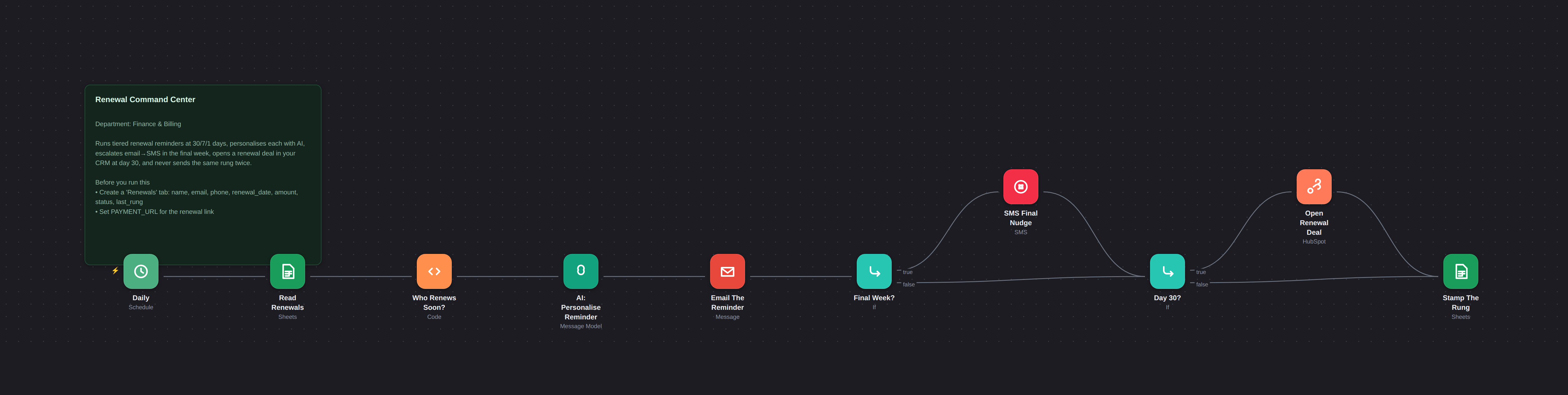
04 / The library
50 workflows, 8 categories, one system.
These aren't 50 unrelated templates. They share three Core modules — a Notify Hub, a Global Error Handler and a Config check — so what one workflow logs, another can read, and a failure anywhere reaches you in one place.
Notify Hub, Global Error Handler and a Credentials/Config check. Import these first; every other workflow leans on them.
One alert stream for 50 workflows — never a silent failure.
Instant lead responder, qualifier & router, quote follow-up drip, missed-call text-back, CRM enricher, no-show recovery, stale-deal nudge, referral asks.
Speed-to-lead and follow-through, automated.
Anniversary touchpoints, winback, review requests, social scheduler, newsletter assembler, abandoned-cart recovery, UTM→revenue attribution.
Consistency without a marketing hire.
Status tracker, document AI summariser, triage & auto-tag, SLA breach alerter, CSAT collector, onboarding sequence, human handoff.
Proactive service, less inbox.
Renewal reminders, invoice generator, overdue chaser, payment reconciliation, expense OCR, dunning recovery, quote→invoice.
Cash in faster, less manual entry.
Document chaser, appointment reminders, e-sign tracker, stock alerts, résumé shortlister, onboarding/offboarding, daily digest, KPI report, duplicate cleaner, cross-app sync, competitor monitor — and more.
The operational glue every business needs.
Every workflow is documented. The 100+ page guide gives each one a chapter with its real canvas, a node-by-node table, the credentials to create, and the mistakes to avoid — so you (or your client's team) can own it, not just run it.
05 / Process
Import, configure, activate.
Import
Three Core modules first, then any workflow you want. n8n → Import from File. Nothing built from scratch.
Configure
Run the Config workflow once — it reports every missing variable. Then follow each canvas sticky note: credentials by name, a handful of n8n Variables.
Activate
Set the shared Error Handler as your default error workflow, switch each automation on, and you have a monitored system running.
To be clear: this is a pack you run on your own n8n, not a managed service. You hold the files, you control every message, and all data stays in your own accounts.
06 / Audience
Built for the people who build automations.
n8n builders & consultants
Ship client automations in days, not weeks. A deployable library with unlimited client-project rights.
Founders & indie hackers
Automate your own ops without spending a month in the editor. Import what you need, ignore the rest.
Freelancers & agencies
A ready inventory to sell from. Every workflow is documented well enough to hand to a client's team.
Ops & automation leads
Standardise the flows your company keeps rebuilding, with shared error handling baked in.
07 / Fit check
What this pack is not.
Worth being explicit, so you buy the right thing:
- ✕Not a hosted service — you run it on your own n8n
- ✕Not a no-code course — it assumes you can navigate the n8n editor
- ✕Not a CRM or a helpdesk — it drives the tools you already use
- ✕Not resellable as files — you may deploy for clients, not repackage the pack
It is a documented, import-ready library of 50 working n8n automations you deploy for yourself or your clients.
08 / Requirements
What you need before you start.
09 / Ownership
You buy it once. You own the files.
✓ What you may do
- ✓Run the workflows in your own business, on any number of your own n8n instances
- ✓Modify anything — prompts, timings, channels, branches
- ✓Deploy customised versions for clients as paid work — unlimited projects
- ✓Use the guide to train your own team
✕ What you may not do
- ✕Resell or redistribute the guide or workflow files themselves
- ✕Publish them to template libraries, repositories or marketplaces
- ✕Bundle them into another product for sale
No refunds. This is an instant download — the moment you pay you hold the whole pack, so it cannot be returned. That is exactly why the full file list, real canvases, requirements and a whole "what this is not" section are published above: decide before you buy, and email me first if anything is unclear. If something is broken or missing, reply to your receipt and I will fix it or send the correct files.
50 Trending AI Business Automation Suite
one-time purchase · no subscription
- ✓50 import-ready n8n workflows across 8 categories
- ✓100+ page guide — a chapter per workflow with the real canvas
- ✓Shared error handling & config check built in
- ✓Commercial licence — unlimited client projects
- ✓Free updates for life
- ✓Instant download — no account, no telemetry
10 / Questions
Answers before you ask.
Are these real workflows or just examples? +
Real, complete n8n workflows — the canvases above are rendered from the actual files you'll import. What they need from you is configuration: your credentials, your spreadsheet, your variables. Each workflow carries its own setup checklist as a sticky note, and the guide gives every one a full chapter.
Do I need HubSpot, Twilio, etc.? +
No. n8n, a Google account and an OpenAI key are the only true requirements. Some workflows use HubSpot (free tier is enough) or Twilio for SMS — without them you still get working email automation; those branches simply stay idle.
Are my API keys stored in the files? +
No. Every node references a credential by name, which you create once in your own n8n. Nothing sensitive lives in the JSON — which also means there's nothing to scrub before you hand a workflow to a client.
Can I use these for client projects? +
Yes — the licence covers your own business and unlimited paid client work. The only restriction is that you can't resell or redistribute the files themselves as a product.
What if a workflow fails at 2am? +
Every workflow routes failures to the shared Global Error Handler, which logs the failure and alerts you once — so 50 active workflows give you one clean alert stream instead of silent breakage.
Can I get a refund? +
No — all sales are final. Once the files are downloaded the whole product is in your hands and cannot be returned, so I would rather answer a question than take a sale that was never a fit: email me before you buy. What you do get is support — if anything is broken, missing or does not work as described, reply to your receipt and I will fix it or send the correct files.
What do I receive after payment? +
Access to the download: the 100+ page PDF, all 50 workflow JSON files, START-HERE, README, licence and changelog. Start with START-HERE, then import the three Core workflows.
Which workflow should I set up first? +
The three Core modules (Notify Hub, Error Handler, Config check) — they take minutes and make everything after them safer. Then pick whichever automation solves your most expensive manual task today.
11 / Ready
Skip the haystack. Deploy the 50 that matter.
Fifty documented, import-ready n8n workflows — for your stack or your clients'.