Insurance AutomationPro Pack
Ten n8n workflows for the processes that quietly decide an insurance year — lead response, quote follow-up, renewals, claims and reporting — with a 111-page playbook that explains every node inside them.
It isn't your closing skill. It's your follow-through.
01 / The problem
The leak grows with your book.
Every insurance business has the same conversations thousands of times a year. Handled well, they compound into retained premium and referrals. Handled by memory and good intentions, they leak — and the bigger your book gets, the more of them slip.
The lead answered tomorrow
A prospect comparing cover is talking to three providers this hour. Whoever replies first frames the conversation.
The quote nobody chased
Acquisition cost already paid. The follow-ups that convert best are exactly the ones that stop happening at volume.
The renewal that slipped
A lapse turns recurring premium into re-acquisition cost — and hands a competitor a warm customer.
The claim waiting on one document
Three weeks stalled because nobody chased a discharge summary. The customer blames you, not the process.
"Any update on my claim?"
Mornings spent answering status calls that a system could have answered before the customer thought to ask.
The pipeline nobody can see
Ask how many quotes are open right now. If the answer is a guess, management is steering by anecdote.
None of this is an effort problem. It's a systematic follow-through problem — which is exactly the kind a workflow engine solves permanently.
02 / Contents
Everything in the download, listed before you buy.
- ✓12 import-ready workflows
Ten insurance automations plus two shared architecture modules — a central error handler and a notification hub — as plain n8n JSON.
- ✓The 111-page playbook
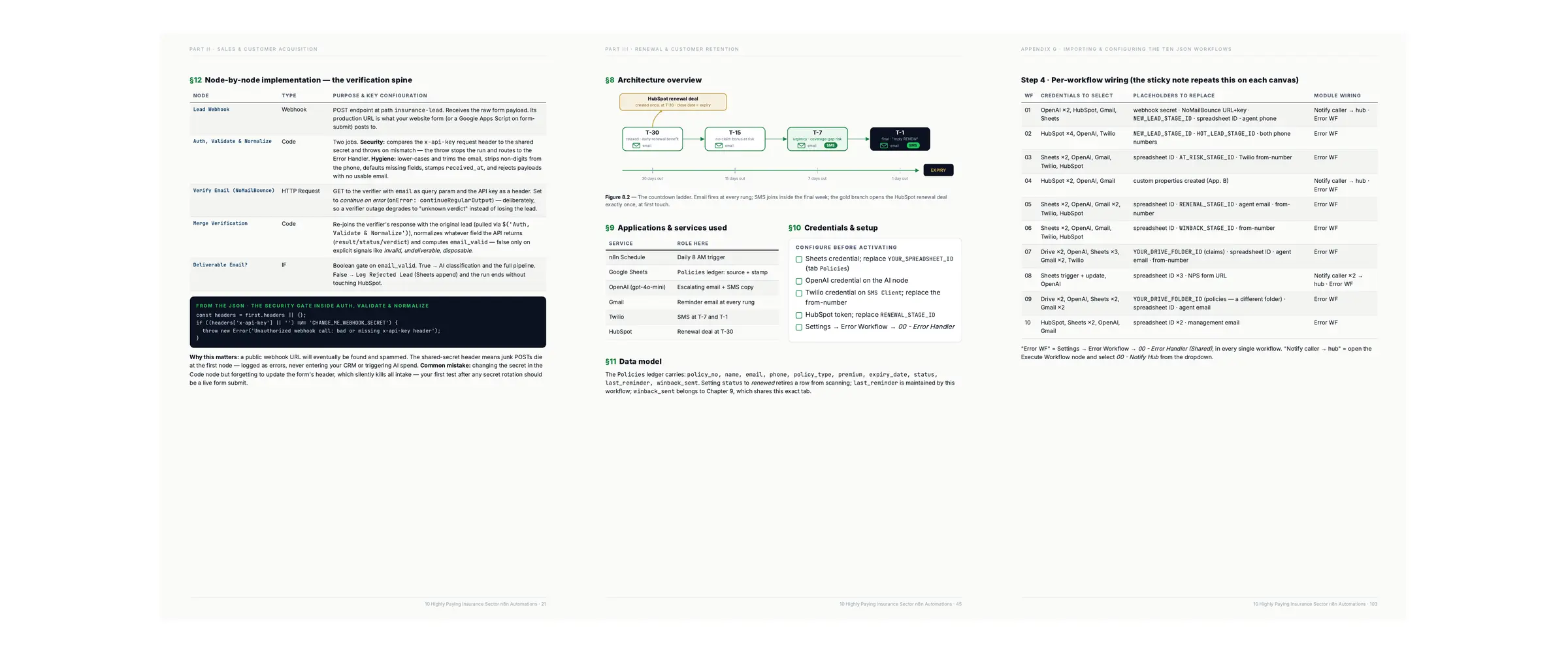
A build manual, not a tutorial: business case, architecture, node-by-node implementation, test scenarios and troubleshooting for every workflow.
- ✓Ten reference appendices
Credentials setup, spreadsheet schemas, every AI prompt printed verbatim, a troubleshooting table and a production deployment checklist.
- ✓On-canvas setup notes
Every workflow carries a sticky note listing its own credentials and placeholders — the checklist travels with the file.
- ✓Free updates for life
Come back to your download link any time. Planned: OCR for scanned PDFs, a per-agent digest variant, a scheduled document sweep.
03 / Proof
Real workflows. Real canvases. Not diagrams of an idea.
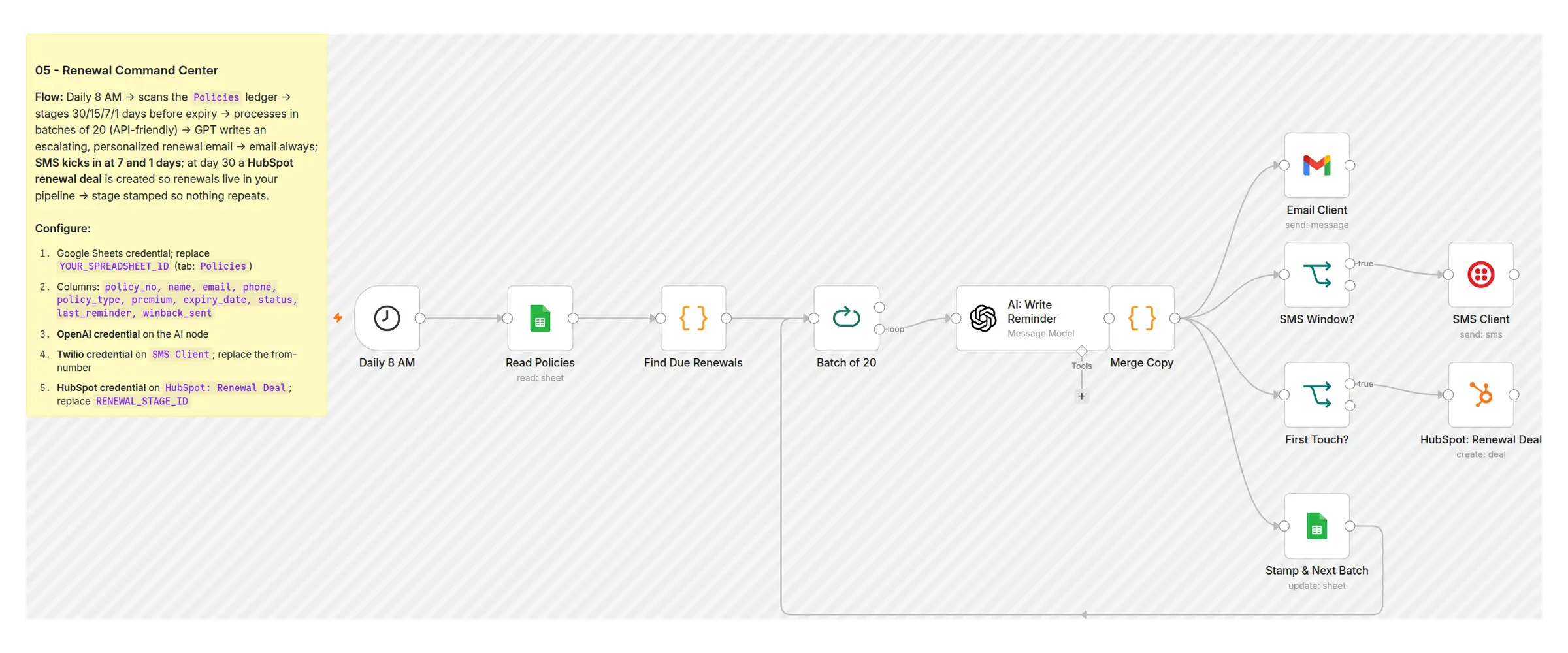
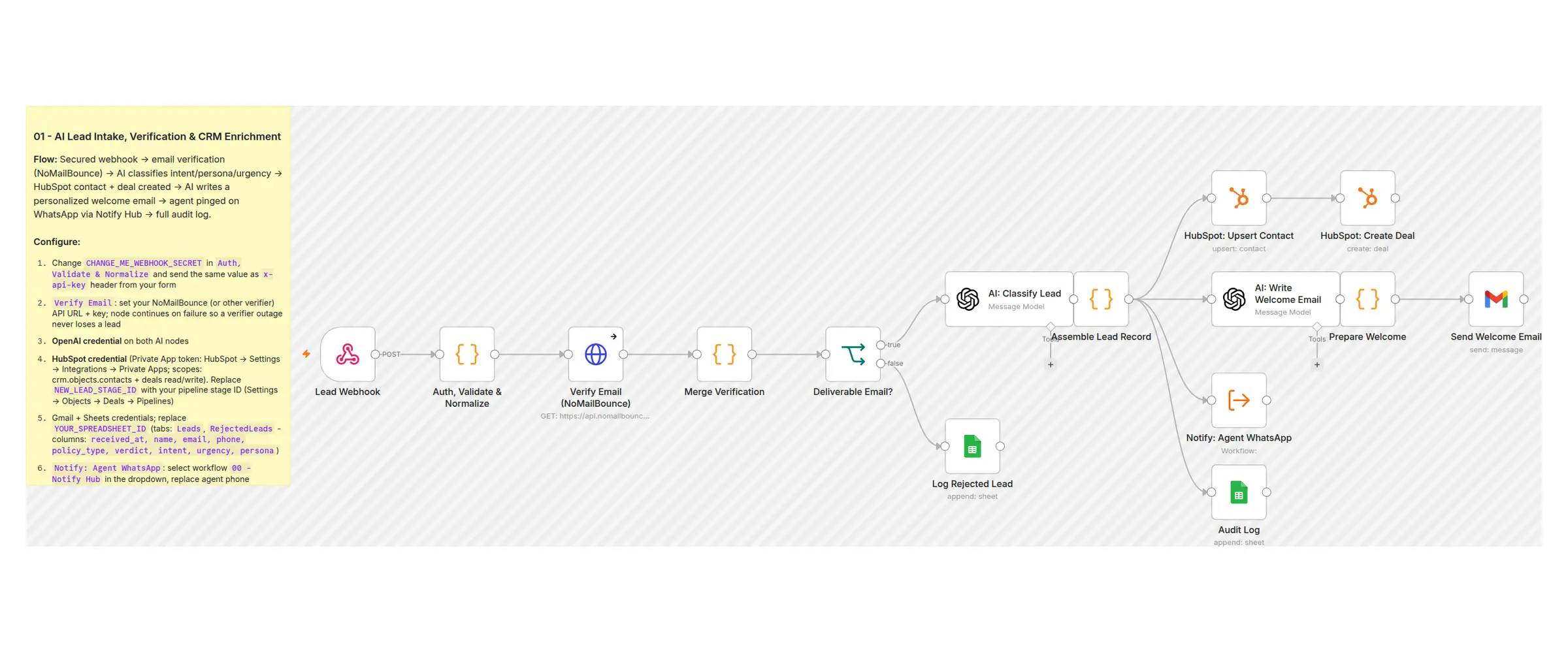
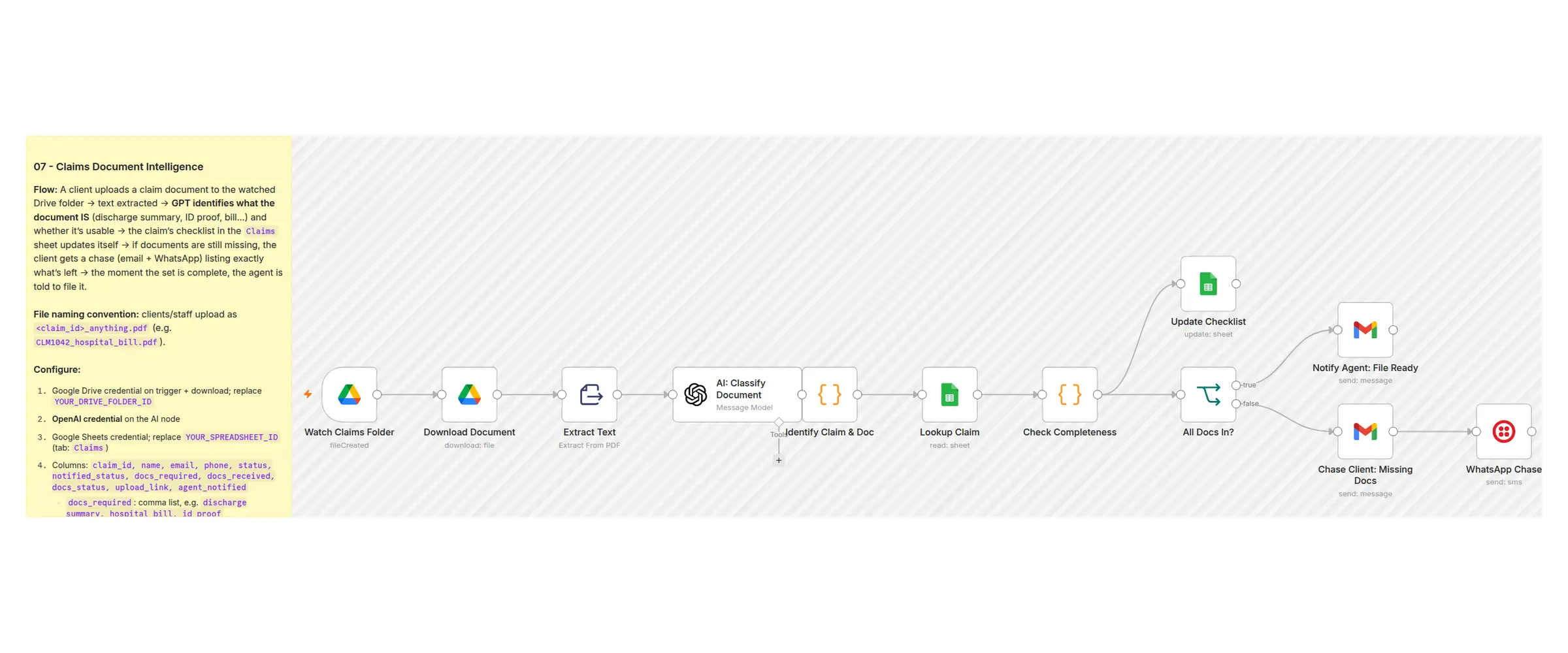
Every image below is a screenshot of an actual workflow in this pack, opened in n8n. The yellow sticky note you can see on each canvas is the setup checklist that ships inside the file — so you always know what to configure next.
✓ Screenshots taken from the actual workflow files — not mockups
04 / The ten
One system, ten revenue processes.
These are not ten unrelated templates. They share one spreadsheet of operational ledgers, one error handler and one notification hub — so what one workflow produces, another consumes.
Secured webhook → email verified before your CRM sees it → AI reads intent and urgency → contact and deal created → personalised welcome sent → agent alerted on WhatsApp.
Speed-to-lead is one of the few conversion levers entirely under your control.
Every new deal scored 0–100 with reasons and a recommended next action. Hot ones promoted in the pipeline and texted to your senior agent; the rest annotated for nurture.
Agents open the day with a ranked list instead of a raw inbox.
Day 2, 5 and 10 follow-ups, each written to a different objection-handling angle. WhatsApp joins from stage two. Still silent at stage three? The deal is flagged at-risk automatically.
Recovers the quotes that quietly expire while everyone is busy.
Birthdays and policy anniversaries, each carrying one soft cross-sell chosen from the policies that client already owns. Logged to the CRM timeline.
Relationship equity, maintained at scale instead of when someone remembers.
Staged reminders at 30, 15, 7 and 1 days before expiry. Email at every rung, SMS in the final week, and a renewal deal opened in your pipeline at day 30. Nothing ever sends twice.
The flagship. Renewal premium is the compounding asset in any book.
Finds policies lapsed 30–90 days, infers the likely reason from product and premium, and makes one well-judged reinstatement approach by email and SMS.
These customers were already paid for once. Recovery beats acquisition.
Every uploaded document is identified by AI against a fixed vocabulary, the claim's checklist updates itself, and the client is told exactly what is still missing — with the agent pinged the moment the file is complete.
Stalled documents stall settlements. This removes the human tracker.
Status changes become customer updates written in the right register — celebratory for approved, genuinely empathetic for rejected — delivered by email and WhatsApp, once per status.
Turns "any update?" call volume into proactive service.
Reads issued policy PDFs, extracts the numbers, and flags mismatches between what was sold and what the insurer actually issued — plus buried red flags like co-pay clauses and sub-limits.
Catches the discrepancy while the free-look window is still open.
Every Monday, one email: pipeline value, win rate, renewals due, premium at risk, open claims, claims stuck on documents — plus three insights and three actions for the week.
Management sees the system working, in its own numbers.
Plus two shared modules: an Error Handler every workflow reports failures to (admin email, SMS and a logged row with a link to the failed run), and a Notify Hub that centralises email, SMS and WhatsApp delivery — so switching provider later is a one-file change.
05 / Process
Import, configure, activate.
Import
Two shared modules first, then the automations you want. n8n → Import from File. Nothing to build from scratch.
Configure
Follow the sticky note on each canvas and Appendix G in the playbook: credentials, spreadsheet ID, pipeline stage IDs, phone numbers.
Test, then activate
Each chapter ships test scenarios — including the re-run test that proves no customer is messaged twice. Then switch it on.
To be clear: this is a pack you run on your own n8n, not a managed service. You hold the files, you control every message, and your customer data stays in your own Google account and CRM.
06 / Audience
Two readers, one pack.
Agents & advisors
Running your own book and losing renewals or leads to the follow-ups that never happened.
Brokers & agency owners
Two to fifty seats, where process consistency is the difference between growth and churn.
n8n consultants
Want a deployable vertical offer. Every chapter closes with what to customise and how to scope it.
Ops & claims teams
Chasing documents and answering status calls that a workflow should be handling for you.
07 / Fit check
What this pack is not.
Worth being explicit, so you buy the right thing:
- ✕Not a policy-administration or issuance system
- ✕Not a CRM — it drives HubSpot, it doesn't replace one
- ✕Not a hosted service — you run it on your own n8n
- ✕Not a beginner n8n course — it assumes you can navigate the editor
- ✕Not compliance advice, and not a guarantee of any revenue outcome
It is a working automation system for the insurance processes that leak revenue when they depend on somebody remembering.
08 / Requirements
What you need before you start.
09 / Ownership
You buy it once. You own the files.
✓ What you may do
- ✓Run the workflows in your own business, on any number of your own n8n instances
- ✓Modify anything — prompts, timings, channels, branches
- ✓Deploy customised versions for clients as paid implementation work — unlimited projects
- ✓Use the playbook to train your own team
✕ What you may not do
- ✕Resell or redistribute the eBook or workflow files themselves
- ✕Publish them to template libraries, repositories or marketplaces
- ✕Bundle them into another product for sale
All sales are final. This is an instant download — the whole product is yours the moment you pay — so there are no refunds or cancellations. That is exactly why the full file list, real screenshots of the workflows, the requirements and a whole section on what this is not are all published above, before you buy. If anything is unclear, email me first and I'll answer directly. Full terms in the refund & cancellation policy.
Insurance n8n Automations — Pro Pack
one-time purchase · no subscription
- ✓10 insurance automations + 2 shared architecture modules
- ✓111-page implementation playbook (PDF)
- ✓Ten reference appendices — credentials, schemas, every AI prompt
- ✓Commercial licence — unlimited client projects
- ✓Free updates for life
- ✓Instant download — no account, no telemetry
10 / Questions
Answers before you ask.
Do these actually work, or are they example workflows? +
They are complete, working n8n workflows — the screenshots above are the real canvases. What they need from you is configuration: your credentials, your spreadsheet, your pipeline stage IDs, your phone numbers. Appendix G walks through every field, and each workflow carries its own checklist as a sticky note on the canvas.
Do I need HubSpot and Twilio? +
No — but seven of the ten use HubSpot (the free tier is enough) and five use Twilio for SMS or WhatsApp. Without them you still get working email automation: the CRM and SMS branches simply stay idle, and the playbook shows where to swap them for something else. n8n, a Google account and an OpenAI key are the only true requirements.
Will it message the same customer twice? +
No, by design. Every outbound workflow writes a stamp — last_reminder, last_followup, winback_sent, notified_status — before it can repeat, and filters on that stamp at the start of the next run. Crash mid-run, re-run manually during testing, restart n8n: nobody gets the same reminder twice. There is a test scenario in each chapter that proves it.
What happens if OpenAI is down or my quota runs out? +
The workflow still completes. Every AI call passes through a merge step with hard-coded fallback copy behind it, so an outage produces a plainer — still correct — message rather than a failed run or a silent gap. The tell is copy that exactly matches the fallback text.
Is this compliant for insurance communication? +
That depends entirely on your jurisdiction, licence category and channels, and it is your responsibility to review. The pack includes operational and compliance logging to support your own controls, but nothing here is legal advice. The playbook is explicit about this, and about one more boundary: AI-generated text never replaces the policy contract or a licensed advisor's judgment.
Can I use it for client projects? +
Yes. The licence covers your own business and unlimited paid client work. Every chapter ends with a Commercial Implementation Opportunity section covering what to customise per client, what stays standard, and how to scope the engagement. The only restriction: you can't resell or redistribute the files themselves.
Can I get a refund? +
No — all sales are final. This is an instant download, so the complete product is in your hands the second you pay. That is precisely why nothing is hidden before purchase: the full file list, real screenshots of the actual workflows, the exact requirements, and a whole section on what this is not. Read those, and if there is any doubt, email me before you buy — I would much rather answer a question than take a sale that was never a fit. If you're ever charged without receiving your download, or charged twice, that's refunded in full.
Is the price the same everywhere? +
It's a one-time purchase, not a subscription. You get the same files, the same commercial licence and the same free updates however you pay.
What do I receive after payment? +
Access to the download: the 111-page PDF, all 12 workflow JSON files, START-HERE, README, licence and changelog. Start with START-HERE, then Appendix G on page 102.
Which workflow should I set up first? +
The two shared modules (they take minutes and make everything after them safer), then 05 — Renewal Command Center. It protects recurring premium, which is the fastest visible return in most agencies. If your bigger pain is speed-to-lead, start with 01 instead.
11 / Ready
Stop losing renewals to a follow-up nobody made.
Ten workflows, one system, running while you sell.